Following the first Video tutorial, today, we want to introduce another helpful reference for you to set up your site: Installing ClassifiedEngine. In this video, you will be guided for installing and setting up your WordPress classified ad site:
1. Upload the ClassifiedEngine theme.
2. Import the Sample data.
3. Complete the main settings.
4. Install WooCommerce and Revolution Slider.
5. Create the menu.
As usual, you can check out the detailed description here.
A slug is a part of URL. For example, “job” is a slug of URL abc.com/job/customer-officer and “resume” is a slug of abc.com/resume/sam-smith. In order to change the slugs, JobEngine does have some filters for you to edit codes so it can define your website better, such as abc.com/position/customer-officer or abc.com/cv/sam-smith.
Sounds cool? Just a small trick will do the magic.
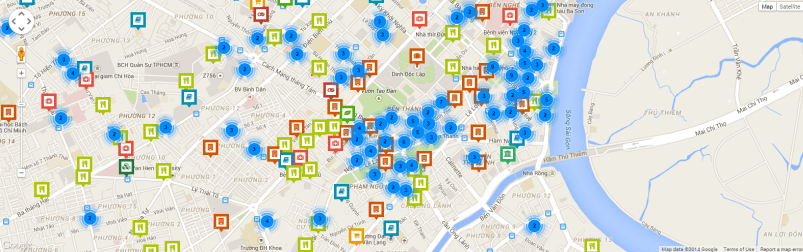
Running a WordPress directory site, of course you want to have as many places being displayed as possible. However, everything has its negative. If you display too many places in your site, the loading speed will be a little bit slow.
With this new update, the problem has a solution. The site’s performance is improved and your users won’t have to wait the map loading for too long.
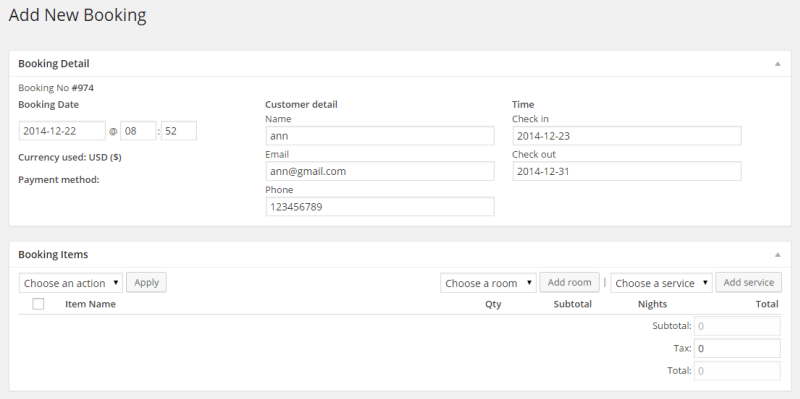
In this update, we focus on optimizing the booking flow so that users won’t meet any trouble surfing the site.
Fix “Directly booking” issue
In the previous versions, admins had encountered some problem while manually making a booking. All the bugs has been ironed out, the hotel owners now can easily add new booking for customers.
This is an article from our new series – Customer Spotlight. Customer Spotlight is a totally new section in our blog page featuring EngineThemes’ customers participating in different industries, who share about their business and experience with our products. With this new page, we hope that our valuable users can have a place to communicate with each other and gradually improve their businesses.
In an effort to provide better and faster support for our beloved customers. Alongside with the “Tutorials” page we’ve just created in our blog, we are happy to introduce another totally new section: Video Tutorials.
We understand that, videos are usually more effective than text. You can easily access the information and directly follow the instructions. We hope that it’ll be a great resource for you to manage and develop your business website.
For the very first post, we’d like to offer the basic yet essential video: How to install your FreelanceEngine.
Following this video, you will see a demonstration including the main steps to install and set up your site:
1. Upload the FreelanceEngine theme. 2. Import the sample data. 3. Create the menu. 4. Using the supported plugin: Revolution slider
For your information, WordPress has just launched it latest version 4.1 which includes some new features to help you manage your site more easily. We know that you are eager to try the new one right away but please don’t rush. We’re testing the compatibility between it and our products so that you won’t meet any trouble using the themes.
We’ll try our best to complete the process as soon as we can. In the meantime, please keep using your current WordPress version. We’ll be back with further good news soon.
Escrow system is a great helpful tool for WordPress business websites, especially when you are working with someone you’ve never actually worked or met. With Escrow system, there’ll be a neutral third party in the transaction holding the money so that it won’t reach the other party until the service or good is delivered. Just like the Switzerland of internet transactions, it helps to reduce the risk of online fraud for both parties. Specifically, for FreelanceEninge, admins can create a trustworthy working environment for the users. You will play a role of an intermediary between the employers and freelancers, holding the money and sending it to the right person.
This tutorial will help you keep some customization when updating the theme, no more worrying about losing the settings anymore. 1. PHP files: Simply copy the files (e.g: header.php or footer.php ) from parent-theme (forumengine) to the child-theme. 2. Javascript files: First, you have to add this code to the file “functions.php” in the child-theme […]
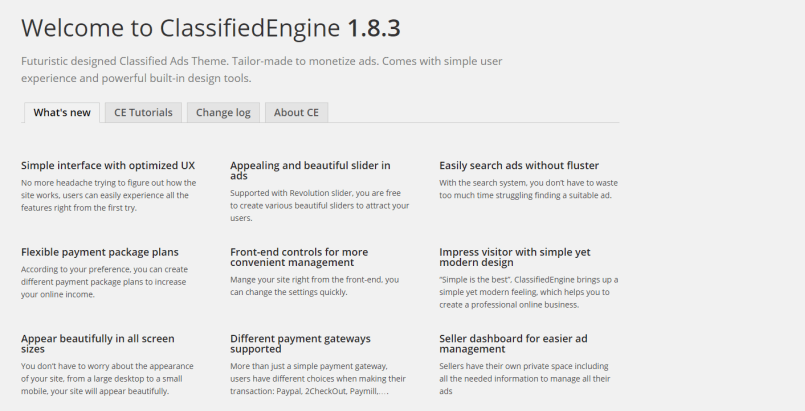
From now on, you can grab all the main information about updates right in your admin panel using the “Welcome” section. There are three information tabs in this section: What’s new?, About CE and Change log.
What’s new?: you can find news of new updated features in this tab.
About CE: Introduction of ClassifiedEngine and how it works.
Change log: latest changes of new versions and files.
It’s officially Christmas season and it means showers of gifts and fun! We’re kicking off a holiday celebration that offers you 25% discount for all of our themes through December. Simply enter the code XMAS25at the checkout and take 25% off of your order when purchase any theme from EngineThemes.
EngineThemes is thrilled to announce the relaunch of our website, which will go live on Monday January 5th, 2015. The team has been working hard for months to prepare for the moment. Finally, here we are proudly telling the world about our most delightful work. Check out our pre-launch page here. And THE BEST THING? To celebrate the relaunch of […]
Looking back, we’ve released QAEngine for more than five months and now it’s time to upgrade it to a higher level. We’re collecting ideas in our forums and realizing this plan steps by steps, if you have any ideas, please don’t hesitate to raise your voice. In the meantime, we’ll keep improved it with some new features and bug fixes.
Since today is the era of globalization, you have no choice but to gradually step out of your country’s border and integrate with the world. Therefore, having a multilingual site will be a great help for you to expand your business. In order to help you improve your directory WordPress site to a new level, DirectoryEngine is once again updated to compatible with WPML. Using WPML, you can translate all the content of your site: pages, posts, custom types, taxonomy, menus and even the theme’s texts. Choose languages for your site, translate content and you can use different languages at the same time.
We use cookies to enhance your browsing experience and analyze our traffic. By clicking "Accept all", you consent to our use of cookies. Accept AllReject
Privacy & Cookies Policy
Privacy Overview
This website uses cookies to improve your experience while you navigate through the website. Out of these, the cookies that are categorized as necessary are stored on your browser as they are essential for the working of basic functionalities of the website. We also use third-party cookies that help us analyze and understand how you use this website. These cookies will be stored in your browser only with your consent. You also have the option to opt-out of these cookies. But opting out of some of these cookies may affect your browsing experience.
Necessary cookies are absolutely essential for the website to function properly. This category only includes cookies that ensures basic functionalities and security features of the website. These cookies do not store any personal information.
Analytical cookies are used to understand how visitors interact with the website. These cookies help provide information on metrics the number of visitors, bounce rate, traffic source, etc.
Cookie
Duration
Description
_ga
1 year 1 month 4 days
Google Analytics sets this cookie to calculate visitor, session and campaign data and track site usage for the site's analytics report. The cookie stores information anonymously and assigns a randomly generated number to recognise unique visitors.
_ga_*
1 year 1 month 4 days
Google Analytics sets this cookie to store and count page views.
_gcl_au
3 months
Google Tag Manager sets the cookie to experiment advertisement efficiency of websites using their services.
_vwo_uuid_v2
1 year
This cookie is set by Visual Website Optimiser and calculates unique traffic on a website.
Advertisement cookies are used to provide visitors with relevant ads and marketing campaigns. These cookies track visitors across websites and collect information to provide customized ads.
Cookie
Duration
Description
NID
6 months
Google sets the cookie for advertising purposes; to limit the number of times the user sees an ad, to unwanted mute ads, and to measure the effectiveness of ads.
test_cookie
15 minutes
doubleclick.net sets this cookie to determine if the user's browser supports cookies.
VISITOR_INFO1_LIVE
6 months
YouTube sets this cookie to measure bandwidth, determining whether the user gets the new or old player interface.
VISITOR_PRIVACY_METADATA
6 months
YouTube sets this cookie to store the user's cookie consent state for the current domain.
YSC
session
Youtube sets this cookie to track the views of embedded videos on Youtube pages.
yt.innertube::nextId
never
YouTube sets this cookie to register a unique ID to store data on what videos from YouTube the user has seen.
yt.innertube::requests
never
YouTube sets this cookie to register a unique ID to store data on what videos from YouTube the user has seen.
_gfpc
session
Gleam sets this cookie to access a third-party marketing platform's API. The cookie is designed to secure user privacy in context with multi-site embedded content.